
How to automate the payment of your Swiss bills?
Stop repatriating your Swiss francs only to send them back to Switzerland later. Pay your health insurance or your 3rd pillar directly at the source.
Updated on
As a worker in Switzerland, you have local bills to pay in Swiss francs (CHF), such as health insurance (KVG/LAMal) or a parking spot. With ibani's "Add a bill" feature, the mechanics adapt to your preferences:
1️⃣ Your employer pays your salary to your receiving ibani IBAN.
2️⃣ ibani deducts and pays your Swiss bill in CHF as soon as your salary arrives (without any exchange or transfer fees).
3️⃣ The rest of your salary is then either automatically exchanged into your local currency and repatriated, or kept in CHF pending your instructions (if you disabled the automatic exchange).
Paying a Swiss bill from a foreign bank account often involves international wire transfer fees (SWIFT) and requires an extra currency conversion. The ibani app has a feature designed to avoid this.
Instead of making your money travel back and forth across the border, discover how to optimize your payments upon receipt of your salary, while keeping control of your exchange rate. When you trigger the exchange manually, you can check the market rate with our converter before converting your remaining salary balance at the moment that suits you.
In this tutorial:
1. Why pay your Swiss bills directly from your salary?
Let's take a simple example: you earn 6,000 CHF net per month and you have to pay 200 CHF for your monthly health insurance premium.
- The traditional method: You repatriate your entire 6,000 CHF into Euros on your foreign account. A few days later, you ask your bank to make a 200 CHF transfer to Switzerland. You therefore perform two successive currency conversions and risk paying bank intervention fees on the international wire transfer.
- The ibani method: Your salary arrives on your ibani IBAN. The system detects your configured health insurance bill. It sends 200 CHF to your Swiss insurer as soon as your salary arrives (cost of the operation: 0 CHF). All that's left is to handle the balance according to your preferences.
| 200 CHF health insurance premium, 6,000 CHF salary | Traditional method | Bill paid from your ibani IBAN |
|---|---|---|
| Currency conversions | 2 (6,000 CHF into euros, then euros into 200 CHF) | None on the 200 CHF of the bill |
| International transfer to Switzerland | Yes, possible bank handling fees | No, payment in CHF (cost of the operation: 0 CHF) |
| Timing of the payment | A few days after the salary is repatriated | As soon as the salary arrives |
| Salary balance | 6,000 CHF converted into euros | 5,800 CHF converted automatically or kept in CHF |
Total flexibility: Automatic or manual exchange
What makes this feature useful is that it adapts to your ibani account settings:
- If you enabled automatic exchange: Once the 200 CHF bill is paid, ibani converts the remaining 5,800 CHF at the real market rate, plus a margin of 0.40% to 0.15% depending on the amount, as soon as your salary arrives, and sends them to your main account abroad.
- If you disabled automatic exchange: ibani pays the 200 CHF bill upon receipt of funds, then keeps the remaining 5,800 CHF in your account. You are free to trigger the exchange manually on the day the exchange rate seems most favorable to you!
2. How do you set up a bill step by step in the ibani app?
Configuration is intuitive and only takes two minutes from your ibani app.
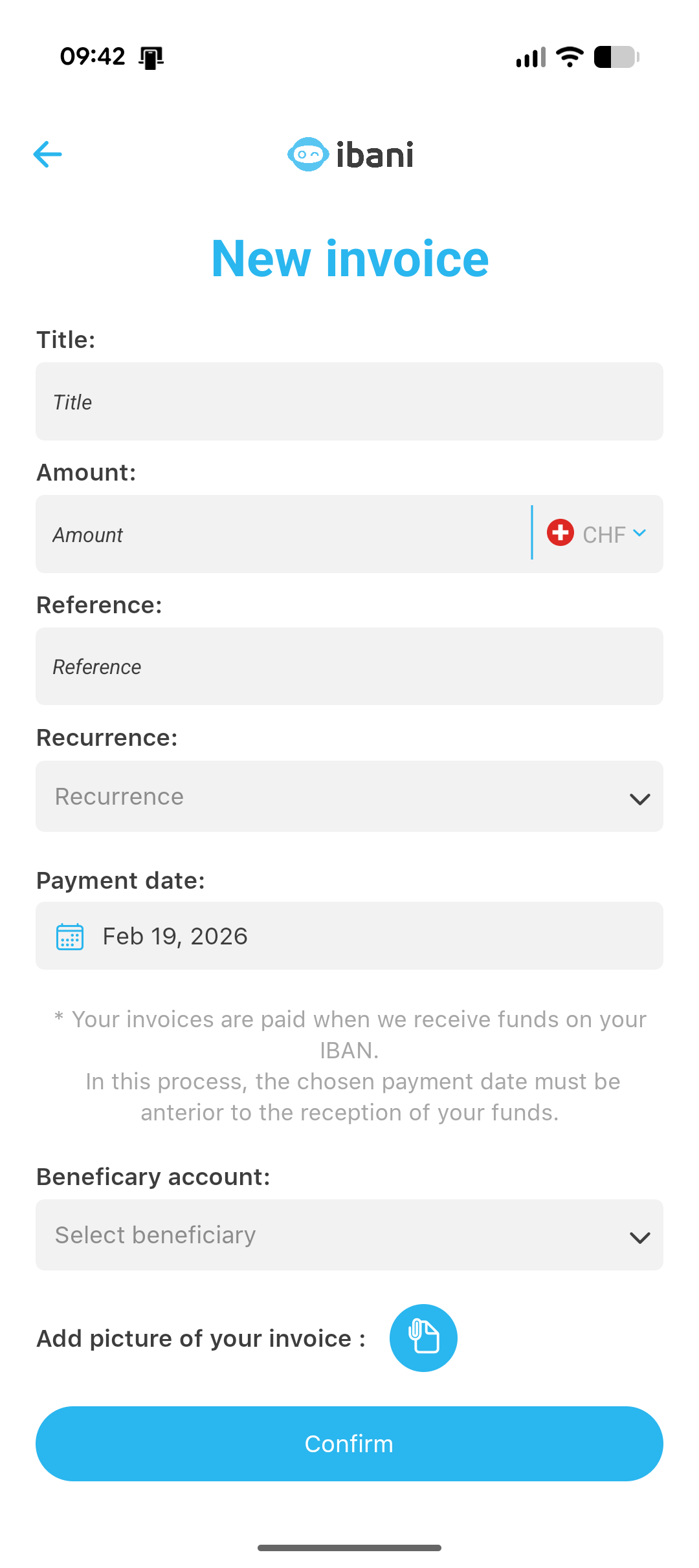
1 Manage your IBANs (Your payment routes): Go to the "IBAN" section of the app. This is where you manage your receiving IBANs (the ones on which you receive your funds). Pro tip: internally, we call these "payment routes" because we allow you to associate specific actions with each IBAN to automate everything.
2 Select the IBAN: Pick an existing IBAN (for example, the one your employer pays your salary into) or create a new one dedicated to this purpose.
3 Start adding: In the options for this IBAN, click on the "Add a bill" button.
4 Bill details: Customize this operation by giving it a clear Title (e.g., "LAMal Premium"). Enter the exact amount in CHF and choose the recurrence (one-time payment, monthly, or quarterly). Do not forget to provide the QR-bill reference number (the QR-bill took over from the BV and BVR payment slips, withdrawn on 30 September 2022) in the communication so that the company recognizes your payment.
5 Beneficiary account: Finally, provide the beneficiary account of the bill, whether it is new or existing (Name of the natural or legal person, full postal address, and the Swiss IBAN starting with CH).
3. Which payment date should you choose for your bill?
During the configuration of your bill (at step 4), the system asks you to choose a "Payment Date". This is where many users make the mistake of trying to guess the exact date their salary will be paid.
Example: You think your employer will pay on the 26th of the month, so you select the 26th. But if HR makes the transfer early and your salary arrives on the 24th, the system will see that the bill date has not yet been reached. The bill will not be paid with this salary!
Simply set today's date.
By selecting today's date, your payment task becomes immediately "ready" in our system. Thus, your bill will be paid upon receipt of your next funds, even if your salary arrives early.
4. Which bills should you automate?
This feature is not reserved only for health insurance. Here are some common uses:
- The KVG/LAMal premium: This is the most widespread use. Swiss insurers (Helsana, Swica, etc.) are very strict on payment deadlines: an unpaid premium leads to a reminder, a formal demand and then debt enforcement (KVG/LAMal, art. 64a).
- The 3rd Pillar (3a): To smooth out your retirement savings effort, schedule an automatic monthly transfer of a few hundred francs to your Swiss pension account, within the annual deduction ceiling (BVV 3/OPP 3, art. 7).
- Rent or parking space: If you rent a parking space near the border or the train station (P+R) on the Swiss side.
Ready to automate your finances?
Open your ibani app now and set up your first Swiss bill applying our pro tip.
Open the ibani appFrequently Asked Questions (Bill Payments)
Can I pay multiple Swiss bills with my ibani salary?
Yes, you can add as many bills as you want (Health insurance, parking, 3rd pillar). The ibani system will pay them all in order of registration upon receipt of your Swiss francs, then manage the remaining balance according to your account preferences (automatic exchange or manual holding).
What happens if my received salary is lower than my bill amount?
If the amount in Swiss francs received on your ibani IBAN is not sufficient to cover the entire scheduled bill, the bill will not be paid (we do not make partial payments). The entire amount received will then be managed according to your usual settings.
Which Payment Date should I choose for my bill?
As explained in our tip, you should always select today's date (the current date). This way, the bill is considered ready immediately by the system, and it will be paid without delay upon the next receipt of your salary, avoiding problems related to early salary payments.
Official sources
- PostFinance and SIX, press release of 19 January 2021: red and orange inpayment slips withdrawn on 30 September 2022 — SIX, accessed 30 September 2026
- Federal Act on Health Insurance (KVG/LAMal), art. 64a: non-payment of premiums, in French — Fedlex, accessed 29 September 2026
- Ordinance on Tax Deductions for Contributions to Recognised Forms of Pension Provision (BVV 3/OPP 3), art. 7, in French — Fedlex, accessed 29 September 2026
Master cross-border finance
Do not miss any of our tutorials (Ibani Champion) to optimize your salary, understand taxation, and gain purchasing power.
Join the ibani club