For CFOs and administrative managers
Automate the reconciliation
of your currency transactions
Integrate your foreign exchange operations directly into your accounting software. Export your ibani data to Bexio, Crésus, Winbiz, or Abacus, eliminate manual data entry, and get rid of unexplained exchange differences at month-end.
The problem with classic currency matching
International payments received on a traditional bank account pose a major challenge for accounting teams: amounts reduced by invisible SWIFT fees, undocumented exchange rates, and truncated references. Here is the ibani solution.
| Classic Bank + ERP | Flow via ibani + ERP | |
|---|---|---|
| Identification of incoming payments Searching for the corresponding client | Manual, via amount search | Automatic via named IBANs |
| Exchange Differences Entering discrepancies at month-end | Must be calculated and entered manually | Exact rate and margin (from 0.40% down to 0.15% depending on the amount) documented |
| Correspondent Bank Fees Justifying incomplete amounts received | Arbitrary and untraceable deductions | No transfer fees charged by ibani |
| Data Integration How data gets into the ERP | Manual entry from PDF statement | Import via structured file (CSV/XLSX) |
Frictionless accounting, without complex API integration
Our system was designed to fit naturally into your existing processes. No costly developments are needed to start automating your reconciliation.
Dedicated Named IBANs
Create a specific IBAN (CHF, EUR, USD...) for each of your regular international clients. When a payment arrives on this IBAN, you instantly and unambiguously know which invoice to attribute it to.
Precise Timestamping
Every currency conversion is timestamped. The applied exchange rate is documented, eliminating guesswork during month-end accounting reviews.
Plug & Play Standardized Exports
Generate transaction statements in CSV or Excel format with one click. The columns (Date, Currency In, Amount In, Currency Out, Amount Out, Rate, Reference) are ready to be ingested by your accounting software.
Multi-User Access
Grant read-only access to your accounting team or external fiduciary. They can download the necessary exports without depending on you, and without having the rights to execute payments.
No Transfer Fees
With a classic SWIFT transfer, intermediary banks may deduct fees along the way, so the amount received is lower than the amount invoiced. A domestic transfer received on your local IBAN does not go through that chain, and ibani charges no transfer fees, which simplifies matching.
Transaction History
All your exchange and transfer operations are gathered in your history, which your fiduciary can view and export for the closing.
Your exports, always available
From the ibani web platform, filter your operations by date or by exchange route, and download the data ready to be integrated into your ERP.
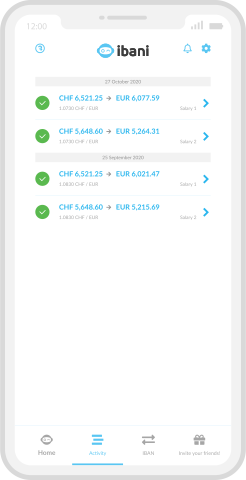
Detailed History
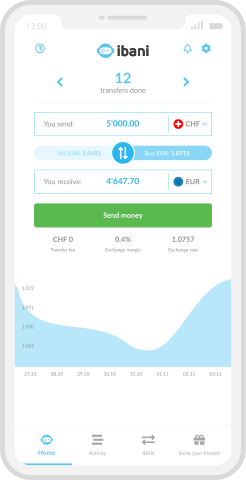
Dashboard
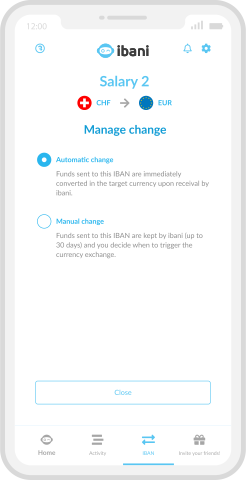
IBAN Management
A secure Swiss financial ecosystem
Your accounting data and funds require absolute rigor.

Technical and Accounting Questions
Free your accounting department from low value-added tasks
Open a free corporate account, set up your collection and payment routes, and test the data export with your ERP today.
✔ Immediate Setup · ✔ No Integration Fees · ✔ No Subscription